
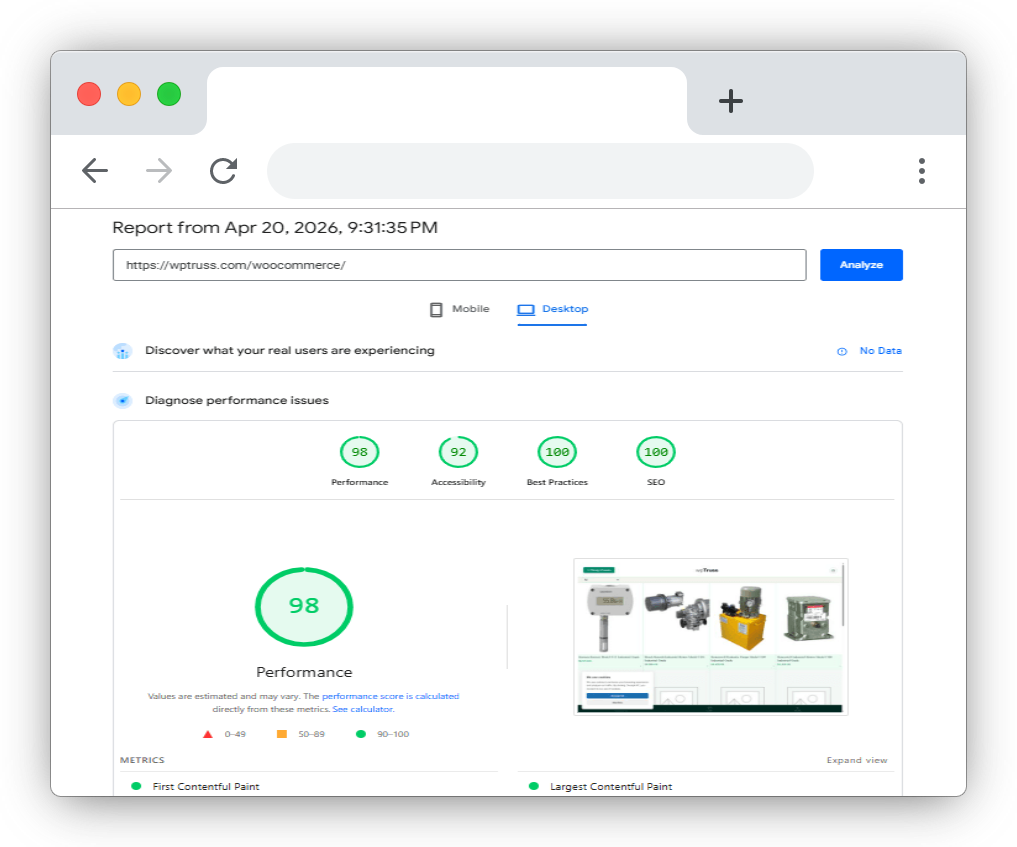
How to get high woocommerce pagespeed score
For a long time, I believed something most WordPress developers believe:
Getting a high WooCommerce PageSpeed score is extremely difficult.
Not because WooCommerce itself is bad, but because the entire ecosystem around it slowly becomes heavy.
Most WooCommerce websites today are running:
- large multipurpose themes
- page builders
- multiple plugins
- animation libraries
- sliders
- popup systems
- tracking scripts
- global CSS frameworks
- global JavaScript bundles
Over time, all of these layers stack on top of each other.
And eventually, the website becomes difficult to optimize no matter how many caching plugins or performance tricks are added.
That made me wonder:
Are WooCommerce performance problems really caused by WooCommerce itself?
Or are they caused by the frontend architecture surrounding it?
After working deeply on frontend systems and testing different architectural approaches, I realized something important:
Most websites are trying to optimize a bloated system instead of reducing the bloat itself.
That realization completely changed how I approached WooCommerce performance.
And surprisingly, it became possible to achieve a 95+ WooCommerce PageSpeed score consistently.
Not through hacks.
Not through aggressive optimization plugins.
But by reducing how much the frontend system actually needed in the first place.
Why Most WooCommerce Websites Struggle With WooCommerce PageSpeed Score
Most people think WooCommerce is naturally slow.
But in many cases, WooCommerce is not the main problem.
The real issue is frontend weight.
A typical WooCommerce website often loads:
- huge theme CSS files
- unused JavaScript
- multiple frontend frameworks
- page builder assets
- slider libraries
- animation systems
- icon libraries
- popup systems
- third-party widgets
Even pages that do not use these features still load their assets.
That means:
- more render blocking
- more JavaScript execution
- larger DOM structures
- higher layout shift risk
- slower interaction readiness
The WooCommerce PageSpeed score starts dropping long before WooCommerce products are even rendered.
This is why many stores keep adding optimization plugins but still struggle to achieve high performance scores.
They are optimizing symptoms instead of solving architectural weight.
The Biggest Problem With WooCommerce Performance
Most optimization advice focuses on:
- image compression
- caching
- lazy loading
- CDN configuration
- minification
These things help.
But they do not solve the core problem.
The core problem is usually this:
The frontend architecture is too heavy.
A simple product page should not need:
- thousands of lines of unused CSS
- multiple JavaScript frameworks
- unnecessary wrappers
- animations that are never triggered
- styles for components that do not exist on the page
Yet this happens on many WooCommerce websites.
And over time, frontend complexity becomes technical debt.
How We Improved WooCommerce PageSpeed Score
The biggest shift happened when we stopped asking:
“How do we optimize this heavy system?”
And started asking:
“How do we reduce how much the system needs?”
That led to several architectural decisions that dramatically improved WooCommerce PageSpeed score.
1. Reducing Global CSS
One of the biggest issues in WordPress themes is global CSS loading.
Most themes ship styles for:
- blogs
- archives
- sliders
- widgets
- forms
- WooCommerce
- galleries
- animations
- menus
- builders
Even if the current page uses only a small subset of those features.
This creates massive CSS waste.
Instead of loading large global stylesheets everywhere, we moved toward component-level styling.
That means:
- components load only their required CSS
- unnecessary styles disappear
- frontend rendering becomes lighter
- debugging becomes easier
The result was a noticeable improvement in WooCommerce PageSpeed score.
2. Reducing Global JavaScript
JavaScript was another major issue.
Many WooCommerce sites globally load:
- sliders
- counters
- animation systems
- accordions
- sticky header systems
- popup handlers
Even on pages where those features are unused.
This increases:
- JavaScript execution time
- Total Blocking Time (TBT)
- interaction delay
- CPU work on mobile devices
Instead of global loading, we started treating JavaScript as contextual.
Only components that required interactivity loaded scripts.
This reduced unnecessary frontend execution significantly.
And yes, it improved WooCommerce PageSpeed score again.
3. Removing Unnecessary Frontend Layers
Many WooCommerce websites unintentionally stack multiple frontend systems together.
For example:
- a theme framework
- a page builder framework
- WooCommerce styles
- plugin styles
- custom overrides
- animation frameworks
Eventually, the frontend becomes a collection of overlapping systems.
This creates:
- duplicated styling
- conflicting layouts
- unnecessary DOM depth
- harder rendering
- difficult maintenance
Reducing frontend duplication had a major impact on performance.
4. Treating Design as a Shared System
Another important shift was separating design consistency from theme dependency.
Traditionally, themes tightly control:
- typography
- spacing
- colors
- layout behavior
- component styling
That creates heavy inheritance chains and unnecessary CSS complexity.
Instead, design values were treated as reusable shared variables:
- spacing
- typography
- shadows
- colors
- radii
- container widths
This reduced duplication across components and made the frontend architecture cleaner.
Cleaner architecture usually leads to better WooCommerce PageSpeed score naturally.
5. Avoiding Unnecessary Wrappers and Deep DOM Structures
Many page builders and themes create deeply nested layouts.
You often see:
- wrapper inside wrapper
- multiple container divs
- layout divs
- alignment divs
- animation wrappers
- builder-specific structures
This increases DOM size rapidly.
Large DOM structures affect:
- rendering
- layout calculations
- browser memory usage
- mobile performance
Simplifying frontend structure made pages lighter and faster to render.
Why Architecture Matters More Than Optimization Plugins
This is something many developers slowly realize after years of optimization work:
Performance plugins cannot fully fix heavy architecture.
They can reduce damage.
But they cannot eliminate unnecessary frontend complexity completely.
If a WooCommerce website needs:
- multiple optimization plugins
- aggressive caching
- JS deferral hacks
- CSS cleanup plugins
- script managers
- database cleaners
…just to become reasonably fast, then the architecture itself is already too heavy.
This is why some websites never achieve a high WooCommerce PageSpeed score consistently even after extensive optimization work.
The system itself requires too much.
A Different Way to Think About WooCommerce Performance
Instead of thinking:
“How do we optimize more?”
It may be better to ask:
“How do we reduce frontend waste?”
That changes everything.
Because high performance websites are usually:
- smaller
- cleaner
- modular
- composable
- context-aware
Not overloaded with unnecessary frontend systems.
How to Improve WooCommerce PageSpeed Score
Step 1: Audit Global CSS and JS
Check:
- how much CSS is unused
- how many scripts load globally
- which plugins enqueue unnecessary assets
You may discover that most pages load assets they never use.
Step 2: Reduce Frontend Duplication
Avoid stacking:
- multiple frameworks
- overlapping plugins
- redundant animations
- duplicate sliders
- conflicting styling systems
The cleaner the frontend stack becomes, the easier it becomes to improve WooCommerce PageSpeed score.
Step 3: Load Assets Contextually
Only load:
- sliders where sliders exist
- filters where filters exist
- animations where animations exist
This dramatically reduces frontend weight.
Step 4: Simplify DOM Structure
Reduce unnecessary:
- wrappers
- nested containers
- builder layers
- decorative markup
Smaller DOM structures improve rendering efficiency.
Step 5: Focus on Architecture First
Caching and optimization plugins help.
But architecture has a much larger impact.
A lightweight system with minimal frontend waste will almost always outperform a bloated system with aggressive optimization plugins.
Why WooCommerce PageSpeed Score Matters
A good WooCommerce PageSpeed score is not just about Lighthouse numbers.
It affects:
- user experience
- mobile usability
- bounce rate
- SEO
- interaction speed
- conversion rate
Slow stores frustrate users.
Especially on mobile devices.
And as websites become more complex, frontend efficiency becomes even more important.
Frequently asked questions
Is WooCommerce naturally slow?
In many cases, frontend architecture, themes, plugins, and unnecessary assets are the real performance bottlenecks.
What is considered a good WooCommerce PageSpeed score?
90+ is excellent
70–89 is decent
below 70 usually indicates architectural or frontend inefficiencies
Why do many WooCommerce stores struggle with performance?
heavy themes
global CSS
global JS
multiple plugins
page builders
duplicated frontend systems
Over time this creates frontend bloat.
Can optimization plugins alone fix WooCommerce performance?
Reducing frontend waste is usually more effective long-term.
Does reducing plugins automatically improve WooCommerce PageSpeed score?
The real issue is what those plugins load:
CSS
JavaScript
database queries
frontend frameworks
Quality matters more than plugin count alone.
Getting a high WooCommerce PageSpeed score is possible.
But the solution is usually not endless optimization tricks.
The real improvement happens when frontend architecture becomes:
- modular
- lightweight
- contextual
- composable
- efficient
The biggest realization for me was this:
We did not achieve a 95+ WooCommerce PageSpeed score by aggressively optimizing a slow system.
We achieved it by building a system that needed less in the first place.
Because in many cases, performance is not really an optimization problem.
It is an architecture problem.