
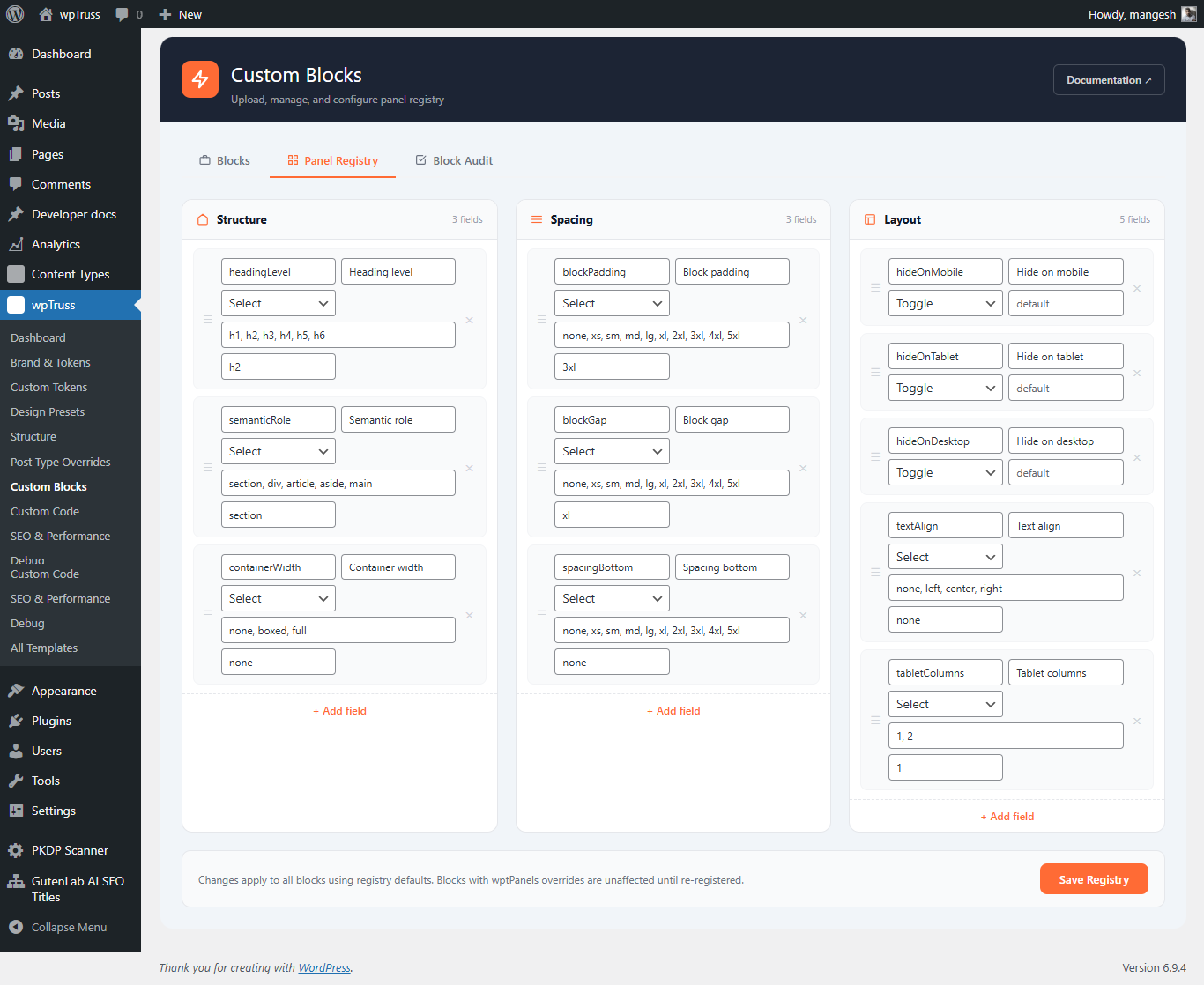
The Panel Registry is wpTruss’s configuration store for three shared Gutenberg inspector panels that any block can opt into: Structure, Spacing, and Layout. Instead of each block hardcoding its own option arrays, blocks declare that they want a panel and the registry provides the options at runtime.
The registry lives in the database (wpoptions under the key wptrusspanel_registry) and is managed from Custom Blocks → Panel Registry in the admin.
The Three Shared Panels
Structure Panel: Always the first panel, always open. Controls the block’s HTML wrapper element and heading level.
| Field | Purpose | Default options |
|---|---|---|
headingLevel |
The HTML heading tag for the block’s primary heading | h1, h2, h3, h4, h5, h6 |
semanticRole |
The HTML element wrapping the entire block | section, article, div, header, footer, aside, nav |
Spacing Panel: Controls block-level spacing. Values map to tokens on the design token scale.
| Field | Purpose |
|---|---|
blockPadding |
Internal padding for the block (top and bottom) |
blockGap |
Gap between major content areas inside the block |
spacingBottom |
Margin below the block |
Layout Panel: Controls responsive visibility and text alignment.
| Field | Purpose |
|---|---|
hideOnMobile |
Toggle – hides block on screens < 640px |
hideOnTablet |
Toggle – hides block on screens 641–1024px |
hideOnDesktop |
Toggle – hides block on screens > 1024px |
textAlign |
Horizontal alignment for block content |
Why the Registry Exists
Without the registry, every block would declare its own option arrays. If you want to add a new heading level or spacing value, you would need to edit every block individually and re-upload each one.
With the registry, you add the new option once in the admin panel, click Save, then click Re-register on any block that should reflect the change. The block’s WordPress attribute registration is updated automatically, no file edits, no re-upload.
How the Registry Is Injected
When the block editor loads, wpTruss injects window.wptPanelRegistry before any block scripts run. This object contains the live definitions from the database.
// window.wptPanelRegistry structure (example)
{
  structure: {
    fields: [
      { key: 'headingLevel', options: ['h1','h2','h3','h4','h5','h6'], default: 'h2' },
      { key: 'semanticRole', options: ['section','article','div','header','footer','aside','nav'], default: 'section' }
    ]
  },
  spacing: {
    fields: [
      { key: 'blockPadding', options: ['none','xs','sm','md','lg','xl','2xl','3xl','4xl'], default: 'lg' },
      { key: 'blockGap',     options: ['none','xs','sm','md','lg','xl','2xl','3xl','4xl'], default: 'xl' },
      { key: 'spacingBottom',options: ['none','xs','sm','md','lg','xl','2xl','3xl','4xl'], default: 'none' }
    ]
  },
  layout: {
    fields: [
      { key: 'textAlign',    options: ['left','center','right'], default: 'left' },
      { key: 'tabletColumns',options: ['1','2','3','4'],         default: '1'    }
    ]
  }
}
Blocks read this object to build their SelectControl options. If the admin adds a new value, all opted-in blocks show it automatically after re-registration, the block code does not change.