
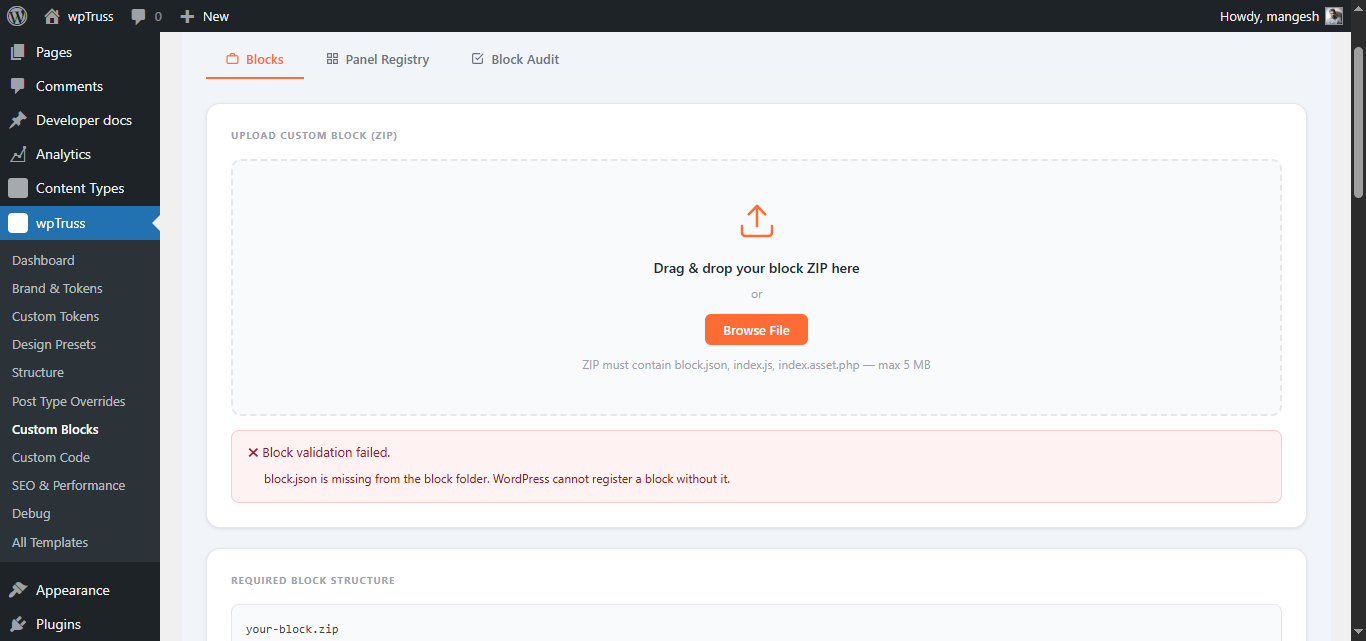
Rule 1 – block.json Must Exist
Severity: Error – blocks fails to register
block.json must exist in the block folder root. If it is missing, the validator stops immediately, no further checks run.
If block.json exists but contains invalid JSON, this rule also fails. Validate your JSON at jsonlint.com before uploading.
✅ PASS: feature-card/block.json exists and is valid JSON
❌ FAIL: block.json is missing from the folder
❌ FAIL: block.json exists but contains a syntax error
Rule 2 – Required Keys in block.json
Severity: Error – block fails to register
block.json must contain all five required top-level keys: name, title, category, editorScript, attributes.
// ✅ PASS
{
    "name":         "wptruss/my-block",
    "title":        "My Block",
    "category":     "wptruss",
    "editorScript": "file:./index.js",
    "attributes":   {}
}

// ❌ FAIL — missing category
{
    "name":         "wptruss/my-block",
    "title":        "My Block",
    "editorScript": "file:./index.js",
    "attributes":   {}
}
Rule 3 – No core/ Namespace
Severity: Error – block fails to register
The block name must not start with core/. This prevents overriding WordPress core blocks.
// ✅ PASS
{ "name": "wptruss/feature-card" }
{ "name": "my-brand/hero" }

// ❌ FAIL
{ "name": "core/paragraph" }
{ "name": "core/custom-hero" }
Use wptruss/ as the namespace for all blocks built for this platform.
Rule 4 – Required Attributes: headingLevel and semanticRole
Severity: Error – block fails to register
Both headingLevel and semanticRole must be declared in the attributes object. Without them, the block cannot participate in the heading governance system or semantic structure control.
// ✅ PASS
"attributes": {
    "headingLevel": { "type": "string", "default": "h2" },
    "semanticRole": { "type": "string", "default": "section" }
}

// ❌ FAIL — headingLevel missing
"attributes": {
    "semanticRole": { "type": "string", "default": "section" }
}
Your index.js must then use attr.headingLevel as the heading tag on the canvas, never hardcode h2 or any other heading level directly.
Rule 5 – editorScript File Must Exist
Severity: Error – block fails to register
The file declared in editorScript must exist in the block folder. The validator resolves the file:./ prefix and checks the filesystem.
// ✅ PASS
block.json: "editorScript": "file:./index.js"
index.js exists in the folder

// ❌ FAIL
block.json: "editorScript": "file:./index.js"
index.js is missing from the folder
Common cause: uploading a project folder that has a build output in a subfolder, rather than the block folder itself.
Rule 6 – index.asset.php Must Exist
Severity: Error – block fails to register
WordPress requires an .asset.php file alongside every registered editor script. The validator checks that index.asset.php exists next to index.js.
If you are not using a build tool, create the file manually:
<?php
return array(
    'dependencies' => array(
        'wp-blocks',
        'wp-element',
        'wp-block-editor',
        'wp-components',
        'wp-i18n',
    ),
    'version' => '1.0.0',
);
Rule 7 – JavaScript Security Scan
Severity: Error – block fails to register
The block’s editor JavaScript is scanned for forbidden patterns. Comments are stripped before scanning.
| Forbidden pattern | Why | Use instead |
|---|---|---|
eval( |
Arbitrary code execution | Remove. Use JSON.parse() for data. |
new Function( |
Arbitrary code execution | Use named functions. |
document.write( |
DOM injection | wp.element.createElement() |
.innerHTML |
XSS risk | wp.element.createElement() or wp_kses() |
.outerHTML |
XSS risk | wp.element.createElement() |
atob( |
Base64 obfuscation | Serve data plainly. |
btoa( |
Base64 encoding | Not permitted in block code. |
window.fetch( |
Unapproved network request | wp.apiFetch() |
XMLHttpRequest |
Unapproved network request | wp.apiFetch() |
import( |
Dynamic import not supported | Declare deps in .asset.php |
require( |
Not available in browser | Declare deps in .asset.php |
Note: .innerHTML is checked with the leading dot so that the word innerHTML appearing in a comment or documentation string does not trigger a false positive. Real DOM assignments (element.innerHTML = ...) always have the dot.
Similarly, window.fetch( is the pattern rather than just fetch( to avoid flagging wp.apiFetch() calls, which contain the substring fetch(.
// ✅ PASS
var p = wp.element.createElement( 'p', null, text );

// ❌ FAIL
container.innerHTML = '<p>' + text + '</p>';
Rule 8 – V1 Motion Compliance
Severity: Error – block fails to register
Block CSS must not contain any transition, animation, or @keyframes declarations. Motion is reserved for the V2 Motion Layer, where it will be governed by motion.json contracts that allow consistent, auditable animation across the platform.
This is a platform governance rule, not a stylistic preference.
Forbidden CSS patterns:
| Pattern | Notes |
|---|---|
transition: |
The shorthand |
transition- |
Sub-properties (transition-duration, transition-property, etc.) |
animation: |
The shorthand |
animation- |
Sub-properties |
@keyframes |
Keyframe definitions |
/* ✅ PASS */
.wpt-my-block__button:hover {
    background-color: var(--wpt-color-primary);
}

/* ❌ FAIL */
.wpt-my-block__button {
    transition: background-color 0.2s ease;
}

/* ❌ FAIL */
@keyframes fadeIn {
    from { opacity: 0; }
    to   { opacity: 1; }
}
The --wpt-transition-* and easing tokens exist in the token ABI but may not be used yet. They are reserved for when the V2 Motion Layer ships.
Rule 9 – Token Compliance
Severity: Warning – block registers but violation is logged
CSS files are scanned for bare hex colour values (#rgb or #rrggbb) outside of var() calls. Each one found is reported as a warning. The block registers, but violations appear in the debug panel.
/* ✅ PASS — hex value is inside var() as a fallback */
.wpt-my-block {
    background-color: var(--wpt-color-surface, #F8F9FA);
    color: var(--wpt-color-text, #1A1A1D);
}

/* ❌ WARNING — bare hex outside var() */
.wpt-my-block {
    background-color: #F8F9FA;
    color: #1A1A1D;
}
Replace every bare hex value with its nearest --wpt-color-* token. If no exact token exists, use the nearest token as the primary value and keep the hex only as a CSS fallback inside var().
Rule 10 – Forbidden Dependency Handles
Severity: Warning – block registers but violation is logged
index.asset.php is scanned for dependency handles that cause blocks to silently fail. Currently one handle is on the forbidden list: wp-primitives.
wp-primitives is an internal Gutenberg build toolchain package, not an exposed WordPress script handle. Declaring it as a dependency causes WordPress to attempt to enqueue a script that does not exist, resulting in the entire block script failing to load with no visible error.
// ✅ PASS
'dependencies' => array(
    'wp-blocks', 'wp-element', 'wp-block-editor', 'wp-components', 'wp-i18n',
),

// ❌ WARNING
'dependencies' => array(
    'wp-blocks', 'wp-element', 'wp-primitives',  // causes silent block load failure
),
Valid dependency handles:
wp-blockswp-elementwp-block-editorwp-componentswp-i18nwpt-element-registry(when using any element)wpt-element-{name}(one per element used)wpt-icon-picker(only when using the icon picker component)